What is E-Lighthouse Network Planner?
The E-Lighthouse Network Planner (ENP) is an advanced tool designed for the planning and analysis of IP/MPLS/SR and transport multivendor networks. Built on extensive R&D expertise, ENP is tailored to meet the needs of network planners and designers. It facilitates network analysis, simulation, and optimization while seamlessly integrating with client databases via RESTful APIs and an intuitive web user interface.
Use Cases
The ENP provides versatile solutions for network planning, management, and optimization. Below are three core use cases where ENP demonstrates its capabilities:
Note
📘 Before running planning simulations, you’ll need to create a network design. See the Creating a New Network Design guide for details.
-
Capacity Planning. ENP enables network planners to forecast future demand and optimize network capacity accordingly. By analyzing current utilization and traffic trends, ENP helps ensure the network is prepared for growth, minimizing congestion risks and avoiding costly upgrades at the wrong time.
-
Network Resilience and Fault Tolerance. Simulate failure scenarios such as link outages or hardware malfunctions to evaluate the network’s resilience. ENP helps identify weak points and recommend strategies to improve redundancy, ensuring high availability and minimized downtime in critical environments.
Check Features in order to view more details about the features available.
Disclaimer: ENP is designed to be flexible and adaptable to a wide variety of network scenarios. Whether you’re dealing with multi-vendor environments, planning expansions, or addressing special cases, ENP can be customized to meet your unique requirements.
System Architecture
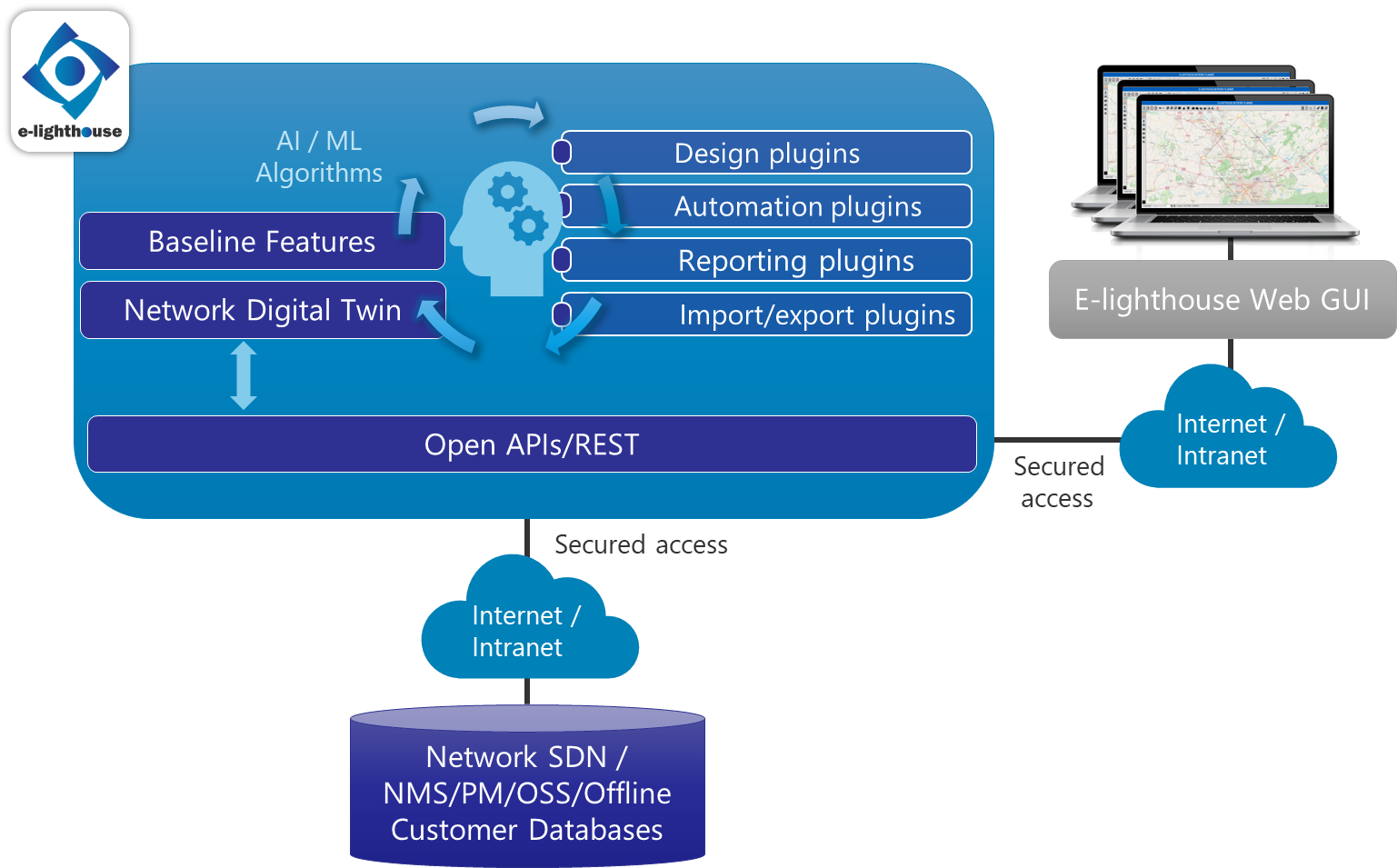
ENP’s architecture is built for high availability, security, and scalability. It is composed of the following key components:
- Application Servers: Hosted either locally or in the cloud.
- RESTful APIs: Enabling integration with external systems.
- Web Interface: A user-friendly, configurable interface for easy access.
- Plugin Modules: Extendable functionalities to suit specific customer needs.
The diagram below provides an overview of the ENP architecture:
ENP Core Functionalities
The E-Lighthouse Network Planner (ENP) is composed of two key components: the Server Module, which powers all network simulation, analysis, and design processes, and the Web Client Interface, which provides an intuitive visualization and interaction layer for users. The web client acts as the front-end interface, while the server module handles the back-end processing, ensuring seamless communication between the two.
Server Module
The server module, built on robust libraries, manages the core operations such as network simulation, analysis, and design. It operates as the backbone of the system, processing data and performing complex calculations. The architecture of the ENP server allows customization and automation, enabling users to integrate ad-hoc applications into their workflows. Key functionalities include:
- Import Modules: Automatically ingest network topology and configuration data from external sources like SDN/NMS databases, allowing the server to construct a real-time, accurate view of the network.
- Export Modules: Convert network designs into customer-specific outputs, such as Bill-of-Materials or other reports.
- Custom Reporting: Generate tailored reports using customer-defined formats for in-depth analysis.
- Automation Scripts: Automate recurrent tasks such as capacity planning by running scripts that leverage the server’s computational capabilities.
Check Network Digital Twin for more details about network simulation capabilities.
Web Client Interface
The Web Client is the visualization layer that interacts with the ENP server. While the server handles the heavy lifting—performing simulations, calculations, and network design—the web client provides an intuitive interface for users to interact with the results. The web interface enables visualization of the network model processed by the server, allowing users to explore and manage the network via a Graphical User Interface (GUI).
The Web Client consists of two key components:
- Topology Window: Offers an interactive canvas where users can view and manipulate network topology as processed by the server.
- Control Window: Provides detailed tables, panels, and tools for network design, analysis, and reporting, all backed by the server’s real-time processing capabilities.
Check Network Visualization GUI for more details about the user interface.
Together, the server and web client create a powerful platform where data is processed on the server and visualized and managed through the web client, ensuring efficient and user-friendly network planning and operations.
Note
👉 To learn how to create a new network design or network plan using the Web Client, see the Step-by-Step Design Creation Guide.
Security and Access Control
Security is at the core of ENP, ensuring data integrity and protecting sensitive information. The key security features include:
- User Authentication: Seamless integration with external access control systems or customizable proprietary schemes.
- Data Protection: Comprehensive security policies to safeguard against unauthorized access.
- Encryption: Industry-standard encryption for data both in transit and at rest to prevent interception or leakage.
Contact or More Information
For more information about the E-Lighthouse Network Planner (ENP) or to request a demo, please contact us at:
- Email: info@e-lighthouse.com
- Website: https://www.e-lighthouse.com
Our team is ready to assist with any inquiries, provide additional documentation, or discuss how ENP can be tailored to meet your specific network planning needs.